
Live preview
WidgetsUpdated Sep 8, 2026
Firesky
Google Calendar
Display one or more connected Google calendars on your church website. Visitors can switch between month, week, and agenda views, open event details, and download calendar events.
Supported providers
- Firesky — Calendars are connected and authorized through Firesky.
Embed
<fs-google-calendar></fs-google-calendar>
Optional attributes
| Attribute | Description | Default |
|---|---|---|
google-calendar | Calendar IDs/configuration to display. Usually generated from the dashboard embed snippet. | Church default calendars |
default-view | Starting view: month, week, or agenda. | month |
time-zone | IANA time zone for event display, such as America/Chicago. | Calendar/church default |
Example:
<fs-google-calendar
  default-view="agenda"
  time-zone="America/Chicago"
></fs-google-calendar>
Features
- Month, week, and agenda layouts
- Multiple named calendars with custom colors (configure in Dashboard → Widgets → Google Calendar)
- Click a calendar name in the widget to show or hide that feed
- Event detail dialog
- Add-to-calendar download
- Responsive layout for desktop and mobile
- Fast loads: the widget paints cached events immediately, then refreshes. It fetches about four months at first and loads more as you navigate.
Connect a public calendar
Firesky reads Google’s public iCal feed. Titles and descriptions only appear if the calendar is public with See event details.
- Open Google Calendar → Settings for that calendar.
- Under Access permissions for events, check Make available to public and choose See event details (not Free/Busy).
- Open Integrate calendar and copy the Calendar ID (or the public URL) into Dashboard → Widgets → Google Calendar.
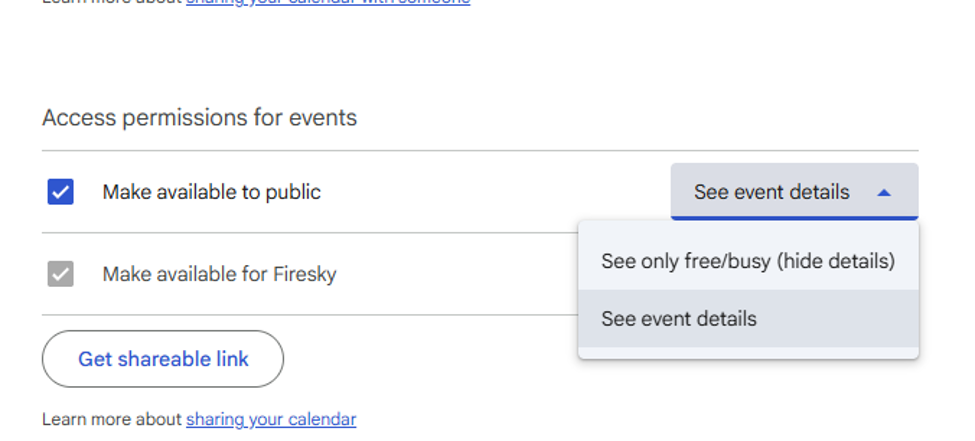
Turn on public access and choose See event details. The organization checkbox can stay gray — that is not what Firesky uses.
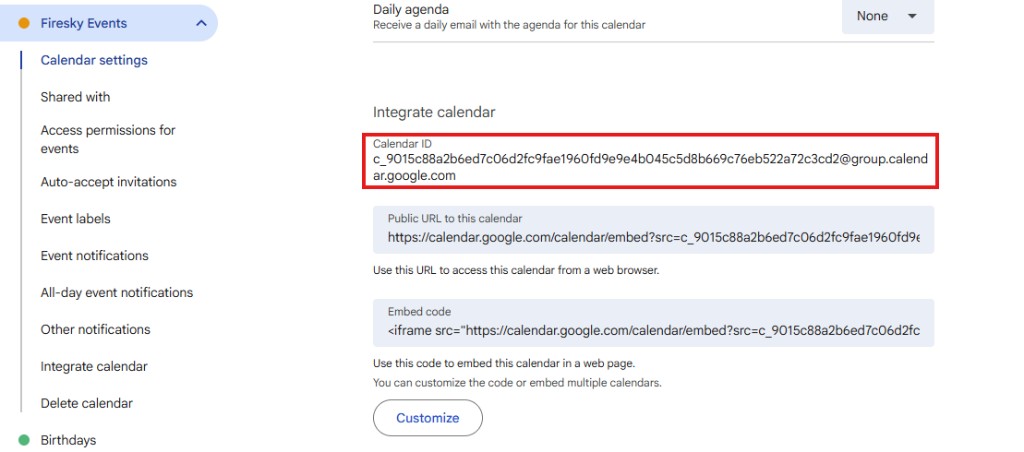
Copy the Calendar ID from Integrate calendar.
If See event details is grayed out, a Google Workspace admin has to allow public calendar sharing in admin.google.com (Apps → Google Workspace → Calendar → Sharing settings). Use a dedicated public events calendar, not a staff person’s primary calendar.
Requirements
- Google calendar access configured for the church
- Allowed origins in Dashboard → Widgets → Allowed origins
- The Firesky widget script installed on the page